


Celebrity and portrait photographer Ian Spanier spends much of his time creating images of notable people for editorial and commercial assignments. However for this personal shoot with aspiring model and actress Tiana Bratten he gave himself a different assignment: build several distinct portraits while putting a new pair of portable V-flats through a realistic studio test.
The result moves from an even, classic portrait to a harder, more graphic look all within one compact production. Just as important, Spanier connected his Canon EOS R5 Mark II directly to an iPad so Bratten could see near-finished photographs as they worked.
For portrait photographers, the session is a useful study in more than lighting. It shows how set control, tethered review, and a trusted creative team can make a shoot more collaborative without slowing it down.
“The right tools allow me to focus on my subjects and the creative process rather than getting bogged down by equipment.” — Ian Spanier

A personal shoot built around a real product test
Spanier first brought the idea for a more portable, sustainable V-flat to Westcott. After a long development process, he received early models to put through their paces. He had already used the flats on celebrity assignments, but those productions did not offer the controlled behind-the-scenes environment needed to show what the tools could do.
So he built a shoot for that purpose.
Once built, Ian brought in hair and makeup artist Donna Gast, one of his frequent creative partners. The plan was to create multiple looks in a real working environment—not simply arrange equipment for a demonstration.
“For me, that’s the best kind of product test: put the gear into an actual shoot, push it, see what works, discover what doesn’t, and figure out how it can genuinely make a photographer’s life easier.”
That mindset is worth borrowing. A lighting tool reveals its value when the subject is moving, the team is making decisions, and the photographer must maintain momentum.
What do V-flats do in portrait photography?
V-flats are large panels that help photographers shape the environment around a subject. Depending on which surface faces the set and where the flat is placed, it can bounce light, absorb stray light, block spill, or create a clean temporary boundary around the frame.
The behind-the-scenes image from Spanier’s session shows black and white V-flat surfaces positioned close to the shooting area. That proximity is what makes a V-flat so useful in a portrait photography lighting setup: it can change the character of the light without requiring another powered fixture.
Spanier’s test also demonstrates the practical advantage of a portable design. He could keep two V-flats in the working set while changing the strobes and modifiers around them for a distinctly different result.
Portrait lighting setup one: a soft, classic two-light look
For the first look, Spanier used two Westcott 43-inch Deep Silver Umbrellas with diffusion. He affectionately calls this soft, classic approach “The Spanier Stack.” The final frames show what the arrangement was designed to deliver: open shadows, smooth transitions across the face, and enough coverage for Bratten to move from a seated pose to a standing, more animated portrait.
The white tank, denim, gray canvas, and natural makeup keep the visual language simple. That puts attention on expression, pose, and the shape of Bratten’s hair. It also gives a portrait photographer room to work quickly without the light becoming noticeably different after every small movement.
Why the soft setup works
- Two large, diffused sources create broad coverage for a range of poses
- The restrained wardrobe and background keep the lighting test visually consistent
- Portable V-flats let the team manage bounce and spill around the subject as the setup changes
- The wider compositions and close portraits still feel like part of the same series

Portrait lighting setup two: harder light and a graphic background streak
For the second look, Spanier changed the character of the session. He used a Westcott 45-Degree Deep Reflector with Apron, an Optical Spot, the FJ800 and FJ400 II strobes, and a streak of light behind Bratten on the background.
The shift is immediately visible. Highlights become crisper, shadows deepen, and the background is no longer passive. The streak adds direction and energy without requiring a new location or a complex set build. Moving closer intensifies the effect: Bratten’s eyes, freckles, makeup, and curls become the composition.
This is a useful portrait-lighting lesson. A second look does not always require replacing every element. Changing the modifier, contrast, and background treatment can be enough to give the client a clearly different set of images while the backdrop, subject, and core production remain in place.
The iPad tethering workflow made the shoot collaborative
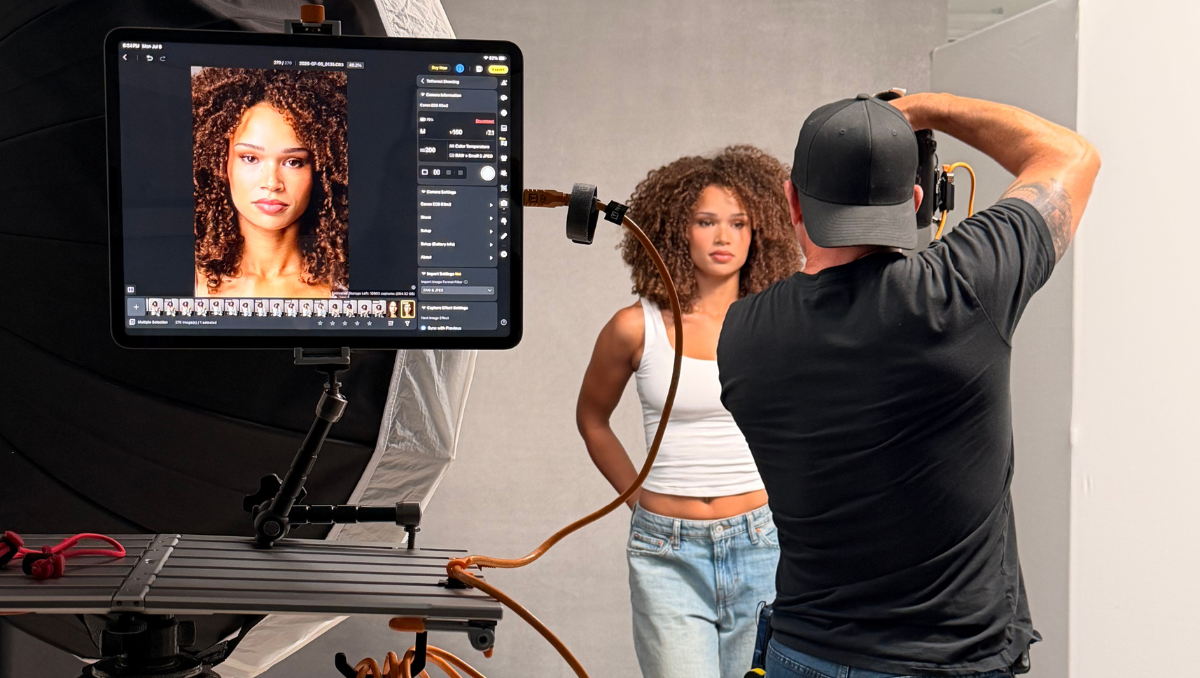
Spanier photographed with a Canon EOS R5 Mark II and a Canon RF 24–105mm F2.8 lens. A TetherPro Optima 10G USB-C Cable secured with a TetherGuard LeverLock Plus Plate connected the camera directly to an Apple iPad running Evoto AI software. On the workstation, the incoming image appeared large enough to evaluate while the shoot was still in progress.
Evoto allowed Spanier to set retouching parameters as he photographed. That meant Bratten could see a near-finished interpretation on screen instead of trying to judge the session from the camera’s rear display.
“When clients can see the results as we go,” Spanier says, “it provides them with a sense of collaboration and comfort that the images we are creating check all the boxes.”
That benefit matters in celebrity portrait photography, where time may be limited and several people can have a stake in the result. It matters just as much on a personal test. A larger live view can help the photographer and subject confirm expression, hair, makeup, wardrobe, framing, and the balance between key light and background before moving on.
Spanier supported the iPad with an AeroTrac Workstation System and articulating arm. His gear list also includes a Tether Tools cable and camera plate lock. For a similar current workflow, photographers can use the TetherGuard LeverLock Plus Plate to add strain relief at the camera and browse TeherPro Optima 10G USB-C tethering cables or tablet and phone mounts for a compatible configuration.
Keep the portrait photography workflow connected through post-production
After the shoot, Spanier planned to fine-tune the selected images in Evoto, then use Adobe Photoshop only if an image needed additional work. In this case, he said the combination of Bratten’s performance, Gast’s hair and makeup, and the Evoto workflow left little to correct.
That is the real advantage of reviewing work while everyone is still on set. Tethered capture does not replace good lighting, styling, or direction. It makes those decisions easier to evaluate while they can still be changed.
Ian Spanier’s portrait photography gear list
Camera, lens, capture, and support
- Canon EOS R5 Mark II
- Canon RF 24–105mm F2.8 lens
- OWC memory cards
- SpiderHolster Grip and Spider X
- Sekonic L-858D-U light meter
- Gitzo tripod
- TetherPro Optima 10G USB-C Cable
- TetherGuard LeverLock Plus Plate
- AeroTrac Workstation System
- AeroTrac Tablet and Phone Mounting System
- Articulating Arm
- Apple iPad
- Evoto AI software
- Adobe Photoshop, if additional retouching is needed
Lighting and set: soft classic look
- Two Westcott 43-inch Deep Silver Umbrellas with diffusion
- Westcott FJ800 strobe
- Westcott FJ400 II strobe
- Westcott FJ-X3 M trigger
- Two Westcott portable V-flats
- Clot Studios canvas background
Lighting and set: harder, graphic look
- Westcott 45-Degree Deep Reflector with Apron
- Westcott Optical Spot
- Westcott FJ800 strobe
- Westcott FJ400 II strobe
- Westcott FJ-X3 M trigger
- Two Westcott portable V-flats
- Clot Studios canvas background
The takeaway: test tools inside a real creative problem
Spanier did not treat the shoot as a static equipment demonstration. He gave the gear a subject, a team, two lighting goals, and a working tethered photography workflow. That is why the images are useful: they show how the tools behave when expression, pacing, feedback, and consistency matter.
For portrait photographers, the lesson is simple. Start with a clear look. Use V-flats to control the space around the light. Make one meaningful change when you want a second visual direction. Then bring the images onto a screen where the photographer, subject, and client can solve problems together.
Production credits
- Photographer: Ian Spanier
- Model/actress: Tiana Bratten —
@ft.ttiana - Hair and makeup: Donna Gast —
@donna_gast - Lighting and V-flats: Westcott
- Tethered workflow: Tether Tools and Evoto AI
